* ADVANTAGES OF CENTRALIZED RETURNS
-
1. You will receive your returns in 2-4 days. Much faster than waiting for them to go back to your merchant's bank.
-
2. The merchant will not be charged an NSF fee from his bank for the returned item.
-
3. You can immediately represent the item online at our secure website or you can download a data file to import into our software to represent the items.
-
4. You can download a zip file of the check images to save per NACHA requirements.
- Close -
* HOW DOES IT WORK?
-
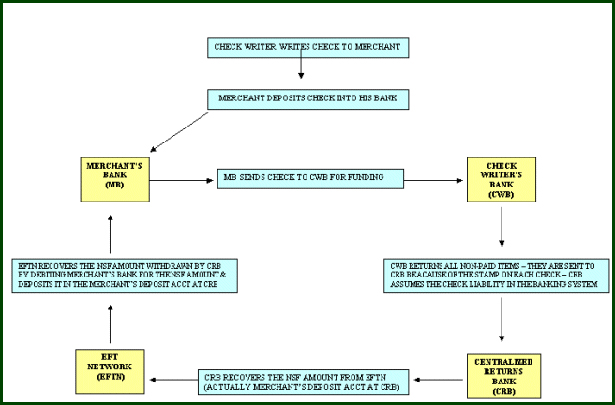
1. Merchant signs up to be in the program.
-
2. The merchant opens a deposit account at our central return bank.
-
3. The account is used to fund the returned item amounts that come back through the central return bank. Generally 12 days of returns should be held for funding, determined by review of 2 months bank statements.
-
4. The account features online banking so that the merchant can view all activity.
-
5. Once in the program, a merchant stamps each check that is being deposited with the centralized returns routing stamp.
-
6. Each return item is returned by the Federal Reserve to the central return bank.
-
7. The return bank images each check and creates a data file of the check.
-
8. We receive the data files and the check image file and do the following:
-
a. Posts them to our secure website and make them accessible to the merchant and/or his collection agency.
-
b. Transfer the return amount from the merchant's deposit account at the central return bank to the return bank. This makes the banking system whole for the deposit of the check made to the merchant's operating bank account.
-
c. We then electronically debit the merchant's operating bank account for the amount of the NSF check to bring the deposit account back to full funding.
-
9. You can then go onto the web and process the items via electronic check representment right on the web.
-
10. You can download the data file and create the representment item in our Checkrep software for upload to our processing center.
-
11. Now you can download the image file of the checks and save in your system.
-
12. Once items are uploaded to our network they are processed as RCK items are normally processed.
- Close -
* IMAGES: VIEWING, PRINTING & DOWNLOADING
Returned checks are available through our Secure Web Site two to four days after deposit. You may Print the images or download files containing the MICR information and Images.
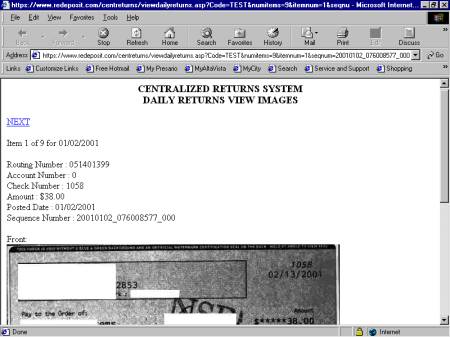
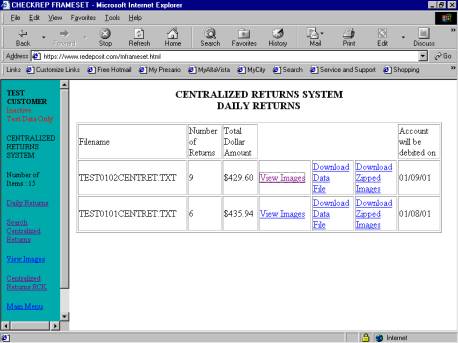 When you click View Images, a new window will open over the current window. The information displayed will be, the check Image number, the MICR information, the front of the check and by scrolling down, the back of the check.
 - Close -
* SEARCHING FOR A CHECK IMAGE
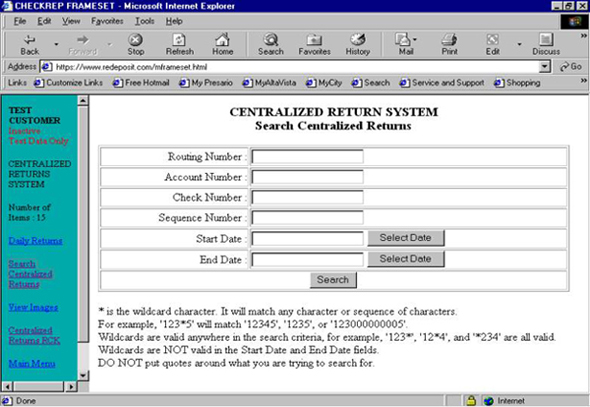
Should you need to search for an image, you can search by entering the pertinent information below.
 - Close -
* ENTERING CHECKS WITH THE IMAGE
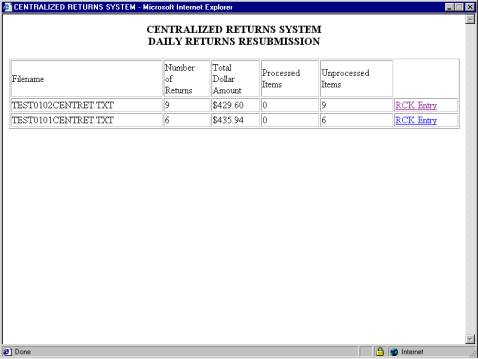
When entering checks you'll see a list of daily returns, we show the total number of returns, check that have not been worked and checks that have been worked. Entering checks is simple, just click RCK Entry.
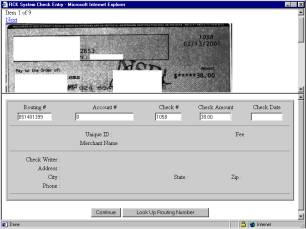
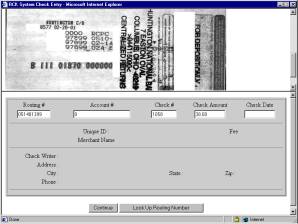
A new window will open, the check image will appear over the check entry screen. You can see the back of the check by scrolling the top portion of the window down. Because we get the MICR information from the bank, we enter the MICR data for you. If the system has seen the check writer before, their name and (if entered) address, city, state, zip code and phone number will appear. If your considering running a front end RCK program for yourself or a client, it may not be necessary to enter the checks into your recovery system until after the checks have been processed through this system. We would be happy to create a file you can upload to your recovery system.
- Close -
|